
Exporting your Base

To export your base click on the download to print button. You’ll need to be signed in.
Basemancer allows you to export at different resolutions. You can export the base bottom or topper on its own, or include decorations fused with an exported topper. Decorations cannot be exported on their own.
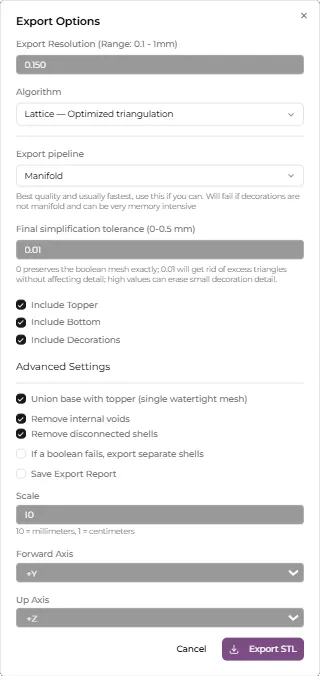
The export resolution is the maximum horizontal distance between two points, so lower is better. By default Basemancer will use the viewport resolution, but if you want maximum detail you can set this lower, down to 0.1mm. This is about the thickness of a human hair.
The algorithm dropdown allows you to pick between either the default lattice or grid surface reconstruction methods. 99% of the time this doesn’t matter, but the grid algorithm can produce better results if your texture has lots of right angles, but can also result in artifacting on very high density natural textures. Leave this at the default lattice.
You can also choose between the Manifold and OpenVDB exporters. For more information on the difference between the two exporters see the exports guide. Leave this on Manifold.
You can choose which bits of the base to export. Exporting the base and topper separately is useful if you have both a resin and an FDM printer. Keep these all ticked.
The Union Base with Topper setting controls whether or not the topper and base are booleaned together. This means that they become a single, watertight mesh. Leave this checked if you want to print the base and topper as a single piece.
Leave the Remove internal voids setting checked. This will clean up the mesh after booleaning it together.
The scale and axis controls control the orientation of the exported mesh and whether it should be rescaled. The default settings should work for most slicers.
Click on Export STL and choose a save location.